
General
Startup, browser and links, input, automations, notifications and the terminal.
What is on it
The busiest tab, and the one most of these settings actually live on rather than where their name suggests.
- Startup and system: reopen the chats you had, keep the machine awake through a long run, hardware acceleration.
- Browser and links: where a link opens, and the master switch for the embedded browser's tools.
- Input and suggestions: prompt suggestions and the smaller composer choices.
- Automations: whether the background service starts at login, and the defaults for unattended runs.
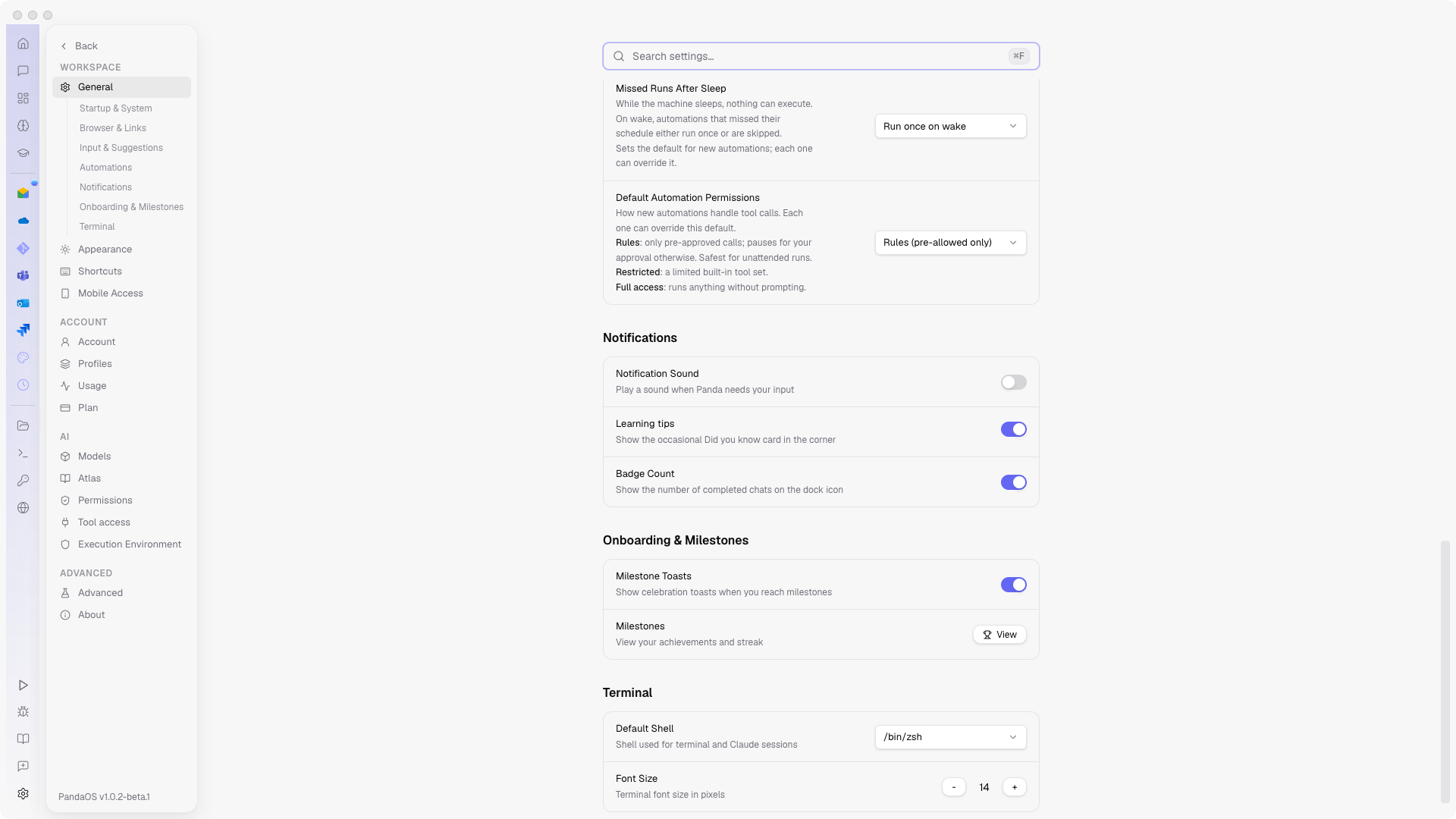
- Notifications: the sound when a chat needs you, and the dock badge.
- Onboarding and milestones: learning tips and Milestone Toasts.
- Terminal: the default shell and font size, shared with the shell the agent uses.
App Actions is here too, the master switch for every connected app's tools.
When a chat needs you
A long turn runs without you, and the sound is how it says it has stopped. Pick one, or turn it off. There is a play button beside the picker so you can hear a sound before you commit to living with it.
The badge on the dock or taskbar icon counts finished chats, which is the quiet version of the same signal: nothing interrupts you, and the number is there when you look.
Learning and milestones
Learning tips is the occasional Did you know card in the corner. Each one names a thing the app does that you have not used yet, and everything it has shown you is collected in the Learning Center under Did you know, so turning the card off never puts the content out of reach.
Milestone Toasts celebrate the moments the app tracks. Both are off-switches for the same kind of thing: PandaOS speaking up when you did not ask a question.
Startup & System
| Setting | What it does |
|---|---|
| Restore Sessions on Launch | Reopens the chats you had open when you last quit. |
| Keep Awake While Waiting | Stops the machine sleeping while a long agent run is in flight. |
| Show in Menu Bar | Keeps a PandaOS icon in the system tray or menu bar. |
| Launch at Login | Opens the PandaOS window when you sign in. Distinct from the background service, see Unattended runs. |
| Use Native File Explorer | Uses the operating system's folder picker instead of the built-in one. |
| Hardware Acceleration | Turn off if the interface renders incorrectly on your GPU. Requires a restart. |
Browser & Links
| Setting | What it does |
|---|---|
| Browser Tools | Master switch for the embedded browser tools, so the agent can navigate, click and screenshot pages. |
| Auto-Open Browser Panel | Surfaces the browser panel when the agent starts using it. |
| Search Engine | Which engine the built-in browser searches with. |
| Open Links in Built-in Browser | Keeps links inside PandaOS instead of handing them to your system browser. |
| Inline Visuals | Lets rich output (charts, tables, small components) render inside the chat thread instead of as plain text. |
Input & Suggestions
| Setting | What it does |
|---|---|
| App Actions | Master switch for every connected app's actions. Individual apps have their own toggle, see Apps. |
| Auto-Open App Tabs | Spotlight: lets app tabs follow along while PandaOS works. Asking to open an app still opens it. |
| Confirmation Timeout | How long an approval prompt waits before it gives up. |
| Prompt Suggestions | Offers follow-up prompts under the composer. |
| Recall Prompts with Arrow Keys | Steps back through what you previously typed, shell-style. |
| Show Turn Stats | Prints cost, duration, turns and tokens under each response. Each of the four is individually switchable. |
Automations
These are the defaults new automations inherit, all explained in Unattended runs: Start Background Service at Login, Keep Running in Background, Automation Approval Timeout, Missed Runs After Sleep, and Default Automation Permissions (Rules, Restricted or Full access).
Notifications
Choose the notification sound PandaOS plays when a run finishes or needs you, test it, or point it at your own audio file. Badge Count controls the count on the app icon.
Onboarding & Milestones
PandaOS ships a light progress track for new users. First Steps is the checklist widget that walks you through connecting an app, running a first chat and so on. Milestones records what you have unlocked as you use the app, on its own page, and Milestone Toasts control whether reaching one interrupts you. Turn any of them off and nothing else changes.
Terminal
Default Shell and Font Size for the integrated terminal and for the shell the agent runs commands in. See Files, Terminal & Browser.