
Connections
A connection is one route to a model: PandaOS Cloud, your own provider key, a local model, or another agent backend. You can have several set up at once and move a chat between them whenever you like.
Several at once
Connections are not exclusive. Set up as many as you want. Each chat remembers which one it is on, so a research chat and a client chat can sit on different routes at the same time.
A new chat opens on your default connection. Changing a chat's connection changes that chat, never the default.
Switching a chat
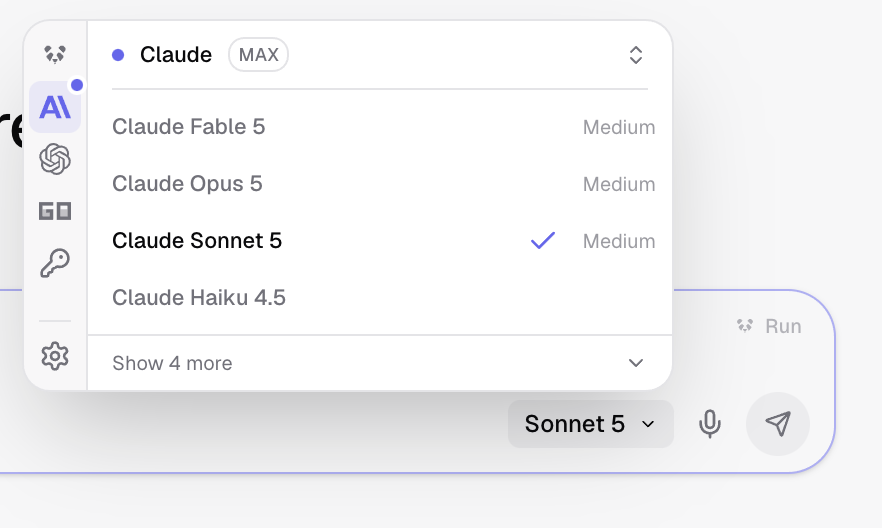
- Open the connection picker in the composer.
- Pick another connection. — The conversation carries over. Nothing is re-sent.
- Carry on. — The next turn runs on the new route.
Permissions do not follow the connection
Tool access and the execution environment belong to the project, so switching route never widens what the app may do.
What changes when you switch
- Usage is counted against whichever connection ran the turn.
- The available models change, because each route offers its own catalogue.
- Nothing about your rules, knowledge or agents changes.
When one runs out
A connection that reaches its usage limit stops the chat until the limit resets, unless you have turned on usage limit failover, which moves the turn to the next connection you have listed.
What is a harness
A harness is the runtime engine that sits between you and the model. The model generates text; the harness is what turns that text into real actions - editing files on disk, running shell commands, calling APIs, managing tool permissions. Without a harness, a model can only talk. With one, it can do.
PandaOS currently supports three harnesses:
- Claude Code - Anthropic's coding agent runtime and the default. Through PandaOS, Claude Code works with models from any provider - not just Anthropic. You can run Claude Code with OpenAI, Google, or any other models available through your connections.
- OpenCode - an open-source Go-based coding agent runtime. It is the harness behind both the OpenCode Go connection and the Local connection, so choosing either one puts you on it.
- Codex - OpenAI's coding agent runtime. Uses OpenAI models through your connected OpenAI account.
What PandaOS adds on top
This is the key insight: PandaOS is not just a wrapper around a harness. It adds a unified layer that every harness benefits from:
- Connected apps - Gmail, Supabase, Vercel, Google Drive, and more become available as tools regardless of which harness you use. OpenCode on its own has no concept of your Gmail inbox; through PandaOS, it does.
- Skills - reusable workflows you have built or installed carry over across harnesses.
- Project configuration - your rules, file structure, and project settings apply no matter which harness is active.
- Permissions and sandbox - PandaOS enforces the same safety boundaries across all harnesses.
This means switching from Claude Code to OpenCode (or back) is instant. You keep all your apps, skills, rules, and project setup. Only the underlying engine changes.
Ways to connect
You choose how PandaOS accesses models:
- PandaOS Cloud - the default. Your subscription includes model access with nothing to configure. You spend Credits as you work, visible under Usage and Credits in settings.
- Your API Keys (BYOK) - bring your own provider keys from OpenAI, Anthropic, Google, Azure, OpenRouter, DeepSeek, Groq, xAI, Mistral, Perplexity, Cohere, Fireworks, Together, Vertex AI, or any OpenAI-compatible endpoint. Add as many providers as you like.
- Local - run models on your own machine through Ollama, LM Studio, KoboldCpp, llama.cpp, or any server that speaks
/v1/chat/completions. PandaOS discovers the ones already running and talks to them directly. - OpenCode Go - a subscription from opencode.ai that serves models through an OpenAI-compatible endpoint, usable from the OpenCode harness or from Claude Code.
- OpenAI Codex - connect your own ChatGPT or OpenAI account to use OpenAI models through the Codex harness.
- Claude - run on your own Claude subscription, or on Claude models hosted in AWS Bedrock.
All six connections can coexist. You are not locked into one.
Choosing and switching models
You pick the model on every message. The available options depend on which connections and harnesses you have active. Providers frequently release new models, and they appear automatically.
If you do not want to choose manually, turn on auto-routing and PandaOS selects the best model for each message based on the task - a lightweight model for simple questions, a more capable one for complex coding tasks.
Switching between connections, harnesses, and models is instant. Your next message simply uses whatever you selected. No restart, no lost conversation state.
Finding Past Chats
Search your chat history from the sidebar, by title, project, or anything said in a message, and let Panda search it too.
Usage limit failover
When a connection reaches its usage limit a chat normally stops until the limit resets. Usage limit failover keeps the turn going by moving it to the next connection in an order you set.