
Execution Environment
Contain what the harness Panda runs on can touch on your machine: filesystem, connected apps, and network, with the same guardrails no matter which model or harness you run.
Keep agents inside your project
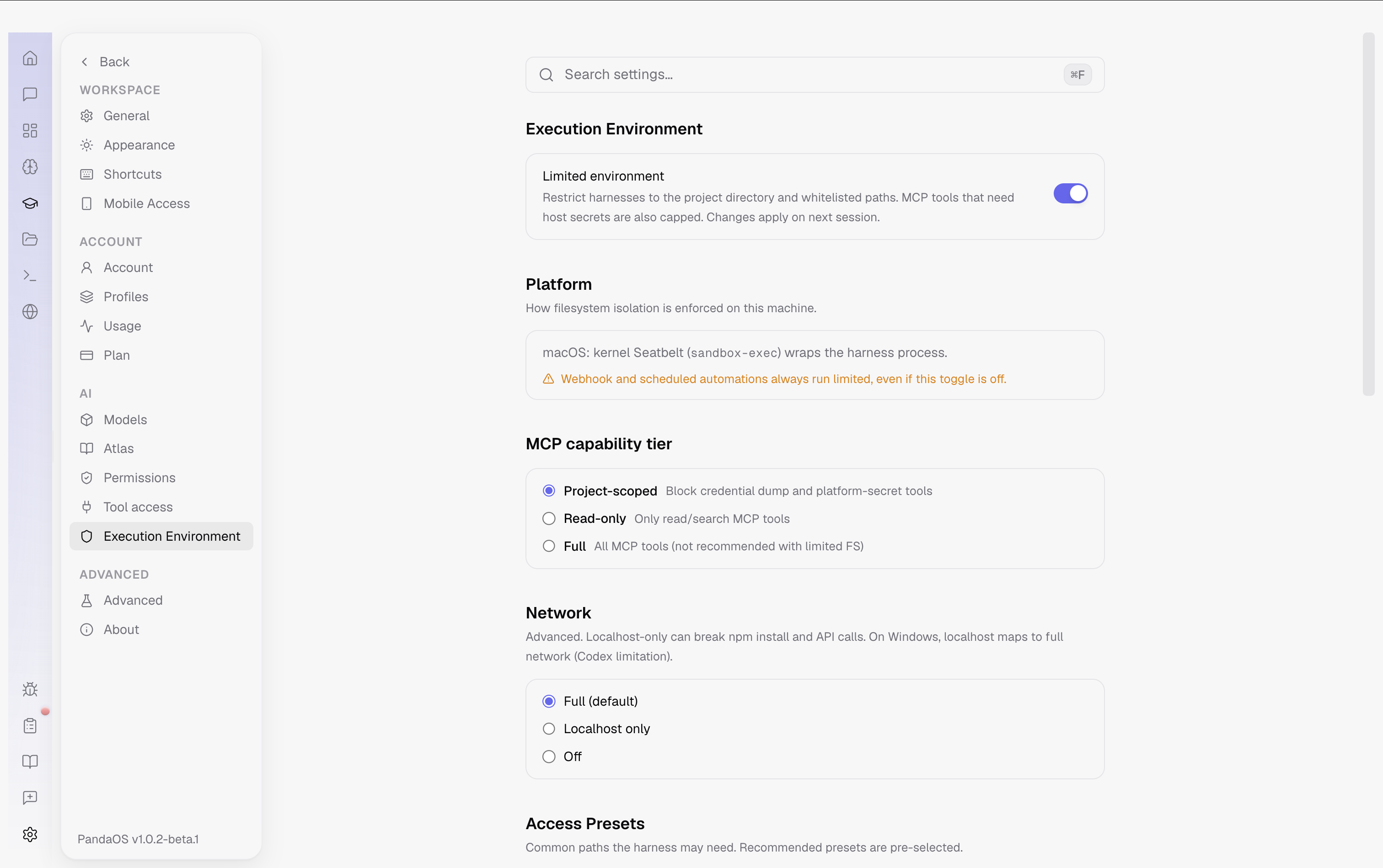
The Execution Environment sets the boundary for what an agent can access. Open Settings → Execution Environment and choose Limited to confine it to your project, selected paths and the network policy you allow.
Turn on the access presets your project needs, add any custom paths, then start a new session for the change to apply. Scheduled and webhook automations always run Limited. The website explains the platform-specific enforcement and every option.
The environments
| Environment | What it means |
|---|---|
| Host (default) | Full filesystem access and the full set of connected-app (MCP) tools, subject only to your permission prompts. Best for trusted local work where you want maximum capability. |
| Limited | The harness is confined to your project directory plus a short list of always-allowed and whitelisted paths. Tools that reach host secrets are capped, and network access can be narrowed. Everything else on disk is invisible to the agent. |
| Isolated | Reserved for fully isolated runtimes (container / VM / worktree) with no host filesystem beyond a mounted workspace. Rolling out, so Limited is the mode most users enable today. |
What "Limited" actually restricts
Turning on Limited applies three independent guardrails at once, so a gap in any one layer is backed by the others.
1. Filesystem containment
The harness can only read and write inside paths you've allowed. A curated set is always allowed so agents keep working normally:
- Your project directory (automatic)
~/.pandaos, app data~/.claude,~/.claude.json,~/.opencode,~/.config/opencode,~/.codex, harness session and config/tmp,/private/tmp, temp folders, scratch space
Everything else under your home directory, including mail, browser profiles, SSH keys and other projects, is denied by default.
Access presets cover the common paths a real build needs, so you can opt in without hand-typing paths. Recommended ones are pre-selected:
| Preset | For | Recommended |
|---|---|---|
Git SSH Keys (~/.ssh) | git push/pull over SSH | ✓ |
| npm / Node Cache | npm install, npx | ✓ |
Homebrew (/opt/homebrew) | Homebrew-installed tools | ✓ |
| AWS, GPG, Docker, pip/pyenv, Cargo/rustup | Cloud CLIs, signed commits, containers, Python, Rust | optional |
Need something outside the presets? Add any folder under Custom Paths (granted read + write).
2. Connected-app (MCP) capability tiers
Filesystem containment alone wouldn't stop an agent from dumping secrets through a connected app, so Limited also caps which MCP tools are available:
| Tier | Behavior |
|---|---|
| Project-scoped (default) | Blocks credential-dump and platform-secret tools (e.g. raw key exports); everyday app actions still work. |
| Read-only | Only read/search tools are exposed, nothing that can mutate state. |
| Full | All MCP tools. Not recommended alongside a limited filesystem, because it re-opens the exfiltration path you just closed. |
Browser automation, which can otherwise sidestep filesystem limits entirely, is disabled in Limited sessions.
3. Network policy (advanced)
Optionally narrow what the harness can reach over the network: Full (default), Localhost only, or Off. Localhost-only is powerful for offline-ish work but will break npm install and outbound API calls, so treat it as an advanced knob.
How it's enforced on each platform
Limited mode is not just an app-level check. Where the OS offers a kernel sandbox, PandaOS wraps the harness process in it. On platforms without one, the app-level path checks and MCP tiers still apply, so the boundary degrades gracefully rather than disappearing.
| Platform | Enforcement |
|---|---|
| macOS | Kernel Seatbelt (sandbox-exec) wraps the harness with a project-scoped profile that denies home reads. |
| Linux | bubblewrap when available; otherwise app-level path checks + MCP tiers. |
| Windows | When the elevated Codex sandbox setup is complete, harnesses run with --run-as-windows-sandbox. Until then, Limited uses app-level path checks + MCP tiers. Run setup from Settings → Execution Environment → Platform. |
So that the model behaves well within its box, the active Limited policy is also injected into the system prompt, so the agent knows which paths are off-limits instead of blindly failing.
Enabling it
Open Settings → Execution Environment.
- Turn on Limited environment. Changes take effect on the next session, so existing chats keep their current policy.
- Review the Access Presets. The recommended set (SSH, npm, Homebrew) is on by default. Toggle on anything your projects need.
- Add any extra folders under Custom Paths.
- (Optional) Choose an MCP capability tier and Network policy for tighter control.
Per-project overrides
A single global default rarely fits every repo. On a project's settings page, under Execution Environment, choose:
- Use global settings, inherit whatever you set globally.
- Custom for this project, enable or disable Limited and set presets and paths for that project alone.
Project settings always win over the global default, so you can run most work on Host and lock down one sensitive repo, or the reverse.
Unattended runs are always contained
There is one case where the sandbox is not optional: automations triggered by a webhook or a schedule run Limited no matter what your toggle says, and their permission mode is capped to Rules. A leaked webhook URL therefore can't fire a full-access, human-out-of-the-loop agent on your machine. Interactive chats you're watching can still use Host; the runs nobody is watching cannot.